Feature Updates
Aug 2026
Raven Mobile App Reporting
You can now create, edit, share, publish, and view Reports directly from the Raven mobile app, making it easier than ever to capture information while you're on the move.

Mobile Reports use the same templates, permissions, and live data as the Raven web platform, allowing teams to work seamlessly across desktop and mobile. Reports can include rich text, images, videos, PDFs, and live Raven data, making it simple to document events from anywhere.
What's New
Create, edit, share, publish, and view reports from the Raven mobile app
Use the same report templates and permissions as the Raven web platform
Include rich text, images, videos, PDFs, and live Raven data
Search and filter reports by date, Log, or report template
Continue working on reports across desktop and mobile with automatic saving
Create reports using both active and archived Logs
Rich Text Support
Long text fields now support rich text formatting within the mobile app, including:
Bold and italic text
Bullet and numbered lists
Hyperlinks
Formatting remains consistent between the Raven mobile app and the web platform, ensuring reports look the same regardless of where they're created or edited.
Why It Matters
Whether you're completing inspections, documenting incidents, or capturing observations during an event, Mobile Reports allow your team to create and manage reports in real time without returning to a desktop. This helps improve efficiency, reduce delays, and ensures important information is captured while it's still fresh.
Aug 2026
Resolutions
You can now track how issues are resolved with Resolutions, giving you better visibility into the work being completed.

When creating or editing an issue, you can select one or more resolutions and add quantities where multiple actions were taken. Resolutions are organized into Resolution Groups and linked to Categories, so the right options appear automatically based on the issue you’re logging.
What this unlocks
• Support for multiple resolutions on a single issue
• Quantity tracking for repeat actions
• Smarter, category-driven resolution selection
Resolutions Reporting
New reporting options are now available to help you analyze resolution data:
• Issues by Resolution (bar chart)
• Issues by Resolution Group (pie chart)
Both charts include quantity values, giving you deeper insight into trends and activity.
Jun 2026
Event Markers
We’ve introduced Event Markers, a new way to structure and control how events and logs progress through defined stages over time.
Event Markers act as named milestones within a log, representing key stages in an event or operational workflow. Each marker can be scheduled at a specific time or set relative to another marker. As a log progresses, Event Markers drive operational activity and provide clear visibility of where the event or log is in its lifecycle.
Define and order milestone stages within a log
Schedule markers at fixed times or relative to other markers
Trigger checklists, integrations, and notifications at each stage
Choose automatic progression or manual step-by-step control
Track all marker changes across records, exports, mobile, and reports
Capture Event Marker context on issues for improved reporting
This feature is available within Log Management settings under Event Timings.

Jun 2026
Reports - Issue Counts
You can now summarize issues by category directly within your report templates, making it easier to present clear, high-level insights without listing every issue. When designing a template, select the Issue Count field and choose the categories you want to track. You can include top-level groups, sub-groups, individual categories, or any combination. Each selection will generate its own count in the final report.

What this unlocks
Clear totals across any mix of categories and groups
The ability to show parent group totals alongside sub-categories
Visibility of item quantities where tracked, with issue counts for context
Separate identification of duplicate issues to avoid inflated totals
Filtering by priority, status, or location for more targeted reporting
Where to use it
Issue Count is ideal when a summary is more useful than a full issue list. Common use cases include:
Security Issues breakdown
Area operational summaries
Any report section where quick category totals are needed

Apr 2026
Raven Reports Redesign
Reports have been upgraded to provide you with an enhanced user experience to make complex information easier to read, faster to scan, and more visually consistent, while preserving the depth and flexibility you rely on, allowing you to take action more confidently than ever.

Cleaner layout and structure — Updated typography, spacing, visual hierarchy, and a redesigned report header improve readability and provide clearer context at a glance.
Clearer sections and smarter layouts — Stronger section headers, improved multi-column layouts, and reduced white space make longer reports easier to follow across mixed field types, including text, dates, yes or no fields, and drop-downs.
Refined fields and components — Checkbox groups and other complex fields are clearer and easier to interpret, with imported records now matching the updated report styling for a more consistent experience.
Updated charts and graphs — Charts have been refreshed with improved spacing, updated colors, better legibility, and consistent filter display across category, priority, time-based, and quantity views.
Full report and PDF updates — All improvements are reflected across web, mobile, tablet, and exported PDFs, resulting in a cleaner, more polished final report.
Apr 2026
Checklist Enhancements
Checklists just got smarter and more flexible, giving you complete control over tasks and workflows.

Bulk edit tasks - Add assignees and deadlines to multiple tasks with a few clicks.
Verification dropdowns - Add mandatory verification dropdowns to individual tasks within checklist templates to ensure responses meet a required set of standards.
Checklist Sections - Organize tasks into sections (e.g., Floors) for clearer structure and easier navigation.
Collapsible tasks on Web and Mobile App - Reduce clutter and focus on the tasks that matter most.
Assign users to sections - Set section-level ownership and override individual task assignments via the bulk edit function.
Create an issue from a task - Instantly turn checklist items into actionable issues.
Duplicate checklist templates - Reuse proven workflows to save time and maintain consistency.
Apr 2026
Log Timings Enhancements
Log Timings now gives you precise control over when checklists appear on your main log for completion, ensuring logs are populated at the right time during an event.
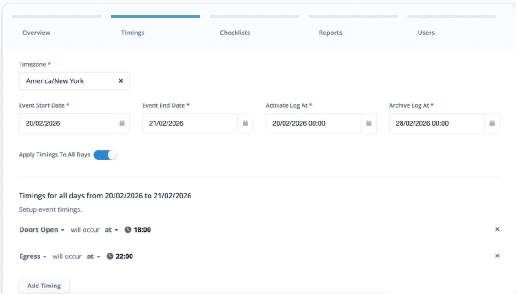
Manage Log Polling - Define exactly when checklists are added to the main log during an event. Using the Timings tab in log creation, you can attach specific event timings to checklists so they only appear on the log when they are due to be completed.
For multi-day events, select 'Apply timings to all days' to replicate the timing configuration across each day of the event. This ensures logs remain structured, relevant, and aligned to live event operations.Auto-Archive - Automatically archive logs once an event concludes, removing the need for manual post-event cleanup.
These enhancements improve operational clarity, reduce manual administration, and ensure checklists appear exactly when they are needed.
Apr 2026
Notification Cleanup Improvements
Notifications are now smarter, cleaner, and more relevant than ever.

Log Timings:
When a user is removed from a notification group, any notifications that no longer apply are automatically removed.
Users only see notifications that are valid for them, reducing clutter and improving focus.
This ensures every user receives only the alerts that truly matter.
Available now:
Access these features today via your account left hand menu and start taking full advantage of enhanced reports and checklists, smarter logs, and more streamlined notifications.
Make sure you have the latest features on your Mobile App by visiting the App Store or Google Play and updating to the newest version.
Nov 2025
Mass Notifications
We’re excited to launch Mass Notifications, a powerful new tool designed to keep your users and contacts informed - fast, clearly, and reliably.

Unlock the Power of Mass Notifications:
Instantly share critical updates: Communicate urgent alerts or announcements with just a few clicks.
Precision targeting: Choose exactly who receives your messages - individual groups, all users, or even external contacts.
Consistency across messages: Use templates to maintain a consistent tone for updates you send frequently.
Stay ahead in evolving situations: Provide real-time updates so your recipients are always in the loop.
Seamless Delivery
Messages can be sent via text or directly through the web app, ensuring your notifications reach the right people, every time. To enable SMS notifications, please make sure each user’s phone number is added to their profile.
View a quick step-by-step walkthrough and tips to get the most from this exciting new feature.